


Newark Airport EWR
4.533.00 Reviews
App Specs
- Version
- 26.8.23
- Updated On
- License
- Free
- Downloads
- 10,000+
- Developer
- FlightInfoApps.com
- Categories
- Travel & Local
- Platform
- Android
Screenshots

 Analysis by AppCompare
If you are flying through Newark and want a focused way to watch what is happening at the airport, Newark Airport EWR is a practical place to start. I found its appeal in being deliberately narrow: instead of trying to become a complete travel planner, it concentrates on the airport information a passenger usually needs close to departure. The app is free to download, belongs to the Travel & Local category, and is developed by FlightInfoApps.com.
That focus makes the first experience fairly easy to understand. You are not opening it to book a hotel, compare airline fares, or build a sightseeing itinerary. You open it because you want to check an arrival, follow a departure, look for a gate, or see whether a delay may affect your plans. For a first-time user, the main value is turning a stressful airport question into a quick status check.
What to expect when you open Newark Airport EWR
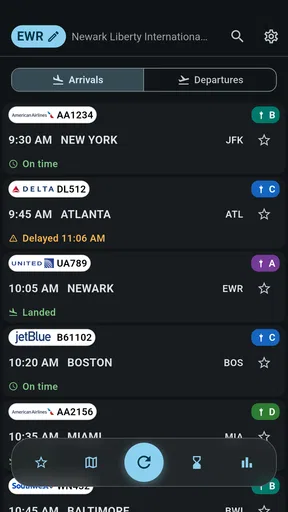
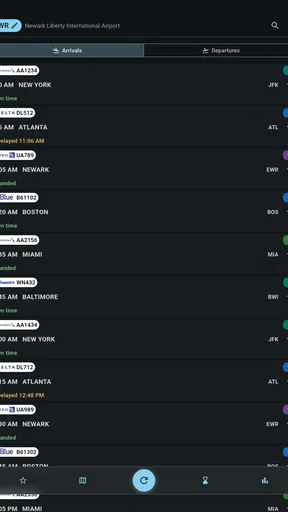
The store summary points to the app’s central purpose: live arrivals, departures, gates, and delays at Newark Airport. In my experience, that makes it most useful during the short windows when travel information changes quickly. Before leaving home, I can use it to get a sense of whether my flight is moving normally. On the way to the airport, I can check again rather than relying on an earlier screenshot or a message received hours before.
The app is specifically built around Newark Airport, commonly identified by the EWR code. That airport-specific approach is both its strongest advantage and its biggest boundary. If Newark is your airport, the limited scope keeps the experience relevant. If your trip involves several airports and you want one broad dashboard for every leg, a general airline or travel app may suit you better.
I would describe the interface as a utility rather than a polished travel companion. Its job is to help you locate current flight information, not to entertain you or guide you through every part of a journey. That distinction matters because it sets a realistic expectation: the app can help you monitor airport movement, but it should not replace your airline’s own communication for booking changes, check-in tasks, baggage rules, or account-specific notices.
The app has been available since November 7, 2013, and its current version is 26.8.23. That long presence suggests a product designed around a continuing airport-information need rather than a short-lived travel trend. At the same time, I would still treat any flight-status tool as something to check alongside official airline and airport information when the consequences are serious.
Its audience rating is Mature 17+, which is worth noticing before installation, especially if you are choosing apps for a family device. The app itself is free, while optional in-app purchases range from $3.49 to $32.99 per item. I would not install it assuming that every possible convenience is included without cost. A sensible approach is to try the basic experience first and decide whether any optional purchase solves a problem you actually have.
Worth Reading Before You Choose

Flipboard Shows What News Apps Must Do Beyond the Feed

Switching to Android Auto Means Rethinking Your Driving Routine

Google Calendar Makes a Crowded Week Easier to Manage

Ludo King Makes the Most of the Minutes Between Plans

Baby Panda World Brings Quick Play to Modern Phones, but Its Game Library Feels Busy

ESPN’s Live Game View Makes Following Close Games Easier
Who gets the most value from it
This app makes the most sense for Newark-based travelers, people meeting someone at EWR, and families coordinating pickups. It can also help a traveler who is connecting through Newark and wants a quick airport-specific reference without searching through unrelated destinations. Frequent visitors may appreciate having a dedicated shortcut instead of repeatedly navigating a general travel service.
It is particularly useful when your question is narrow. “Has the flight arrived?” “Is the departure delayed?” “Which gate is currently shown?” These are better matches than broad questions such as “What should I do during my trip?” The more your need resembles a live airport board, the more naturally the app fits.
I would be less enthusiastic about recommending it to someone who rarely uses Newark, wants a full itinerary manager, or needs deep airline account integration. A traveler who values boarding-pass storage, loyalty details, booking management, and automatic trip organization may find an airline app more useful. A person comparing multiple airports may prefer a general flight tracker. Newark Airport EWR wins through concentration, not breadth.
Setting it up without making the first check confusing
Installation is straightforward in principle: search for Newark Airport EWR, check that FlightInfoApps.com is shown as the developer, and confirm that the app matches the Newark-focused purpose before opening it. Because similarly named airport and flight tools can appear in search results, checking the developer and the EWR reference is a small but worthwhile habit.
Once it is open, I recommend starting with one specific flight rather than browsing randomly. Have the airline, flight number, or travel date available if you are checking your own journey. If you are meeting someone, ask for the exact flight details instead of relying only on the passenger’s name or an approximate arrival time. A precise starting point reduces the chance of selecting the wrong service, especially during busy travel periods.
Do not treat the first screen as a complete explanation of your trip. Read the labels carefully and distinguish arrivals from departures. This sounds obvious, but it is an easy mistake when you are tired, rushing, or checking a relative’s flight while also arranging transportation. I find that deciding in advance whether I am tracking a plane coming into Newark or leaving Newark makes the rest of the interaction quicker.
The minimum operating requirement is Android 7.0 or later. That makes compatibility an important first check for anyone using an older Android phone. If the device meets that requirement, the next practical question is not whether the app can replace every other travel tool, but whether its airport-specific information is enough for the task at hand.
Because the app is free to start, I would avoid making a purchase during setup. First confirm that the basic flight lookup fits your routine. If you only need occasional arrival or departure checks, the free starting point may be all you need. If an optional feature becomes relevant later, you can judge it based on a real inconvenience rather than an assumption about what might be useful.
A simple first-use routine
My recommended setup routine is deliberately modest:
Open the app when you have a known Newark flight to check.
Choose the relevant arrival or departure view instead of scanning both without a purpose.
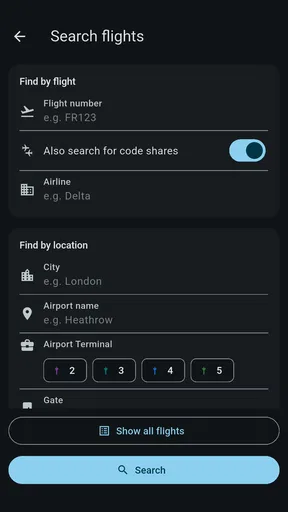
Search using the most exact flight detail available.
Compare the displayed status with the latest message from the airline before making an expensive decision.
Check again near the time you leave for the airport, because an earlier status can become outdated.
This routine is more reliable than opening the app once at breakfast and assuming the result will remain valid all day. Flight information is time-sensitive. The app is most valuable when used as a repeatable checkpoint, not as a permanent guarantee.
Your first meaningful success: checking a real Newark flight
The first successful action should be concrete: use a flight you genuinely care about and find its current airport status. For a departure, I would check before leaving home, then again while traveling toward EWR. For an arrival, I would check before heading out to collect someone and again when the expected landing window is close. This gives the app a fair test in the situation it is meant to serve.
Imagine a realistic evening pickup. A friend is flying into Newark, and you are deciding whether to leave immediately or wait at home a little longer. Instead of basing your decision on the scheduled arrival alone, you open the app and look for the flight’s current arrival information. If a delay is shown, you may avoid an unnecessary drive or a long wait. If the flight appears to be progressing normally, you can time your departure more confidently, while still allowing for traffic and the time needed to reach the pickup area.
That scenario reveals an important strength: the app can support decisions around the flight, not just satisfy curiosity about it. The status becomes useful when connected to an action such as leaving for the airport, arranging a ride, or warning someone that plans may need to change.
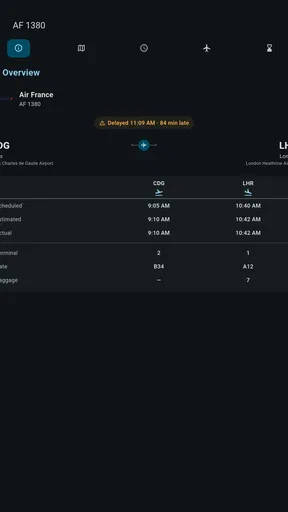
For departures, I would use the gate information as a planning clue rather than treating it as permanent. Gates can change, and airport movement does not stop after you have checked once. A useful habit is to look at the gate before leaving for the terminal and then verify it again once you are inside the airport. That two-stage check is more sensible than memorizing the first gate you see.
The same principle applies to delays. A delay shown in the app can explain why a traveler is still waiting, but it does not automatically tell you whether boarding will begin soon, whether the aircraft has arrived, or whether the airline has issued a separate rebooking instruction. I use the app to understand the airport status and the airline’s own channels for passenger-specific decisions.
Three habits that make the app more useful
First, track the flight rather than the person. A passenger may change plans, but the flight number and airport movement are the details that connect directly to arrivals, departures, gates, and delays. This is especially helpful when coordinating with relatives or friends who are not comfortable navigating travel apps themselves.
Second, take a mental snapshot of the time you checked. Status information is meaningful only in context. If you tell someone that a flight is delayed, also tell them that you checked recently. That small habit prevents an old update from being treated as a current promise.
Third, use the app to decide when to verify elsewhere. If the status changes unexpectedly, the app has done its job by alerting you to investigate. At that point, check the airline’s current message or airport announcements before changing a connection, canceling a ride, or making a costly booking. This layered workflow is safer than asking one source to answer every travel question.
These habits are not flashy features, but they are where a focused airport app becomes genuinely useful. The advantage is not simply seeing a status; it is building a quick routine around the status so that the information leads to a better decision.
Common points of confusion and where the limits appear
The most common confusion is likely to come from treating a displayed gate as a final gate. Airport operations can change, so I would never walk directly to a gate based on one earlier check without looking again. The app can reduce uncertainty, but it cannot remove the need to pay attention once you are at EWR.
Another point of confusion is the difference between a flight delay and a passenger instruction. A delayed departure may still require the traveler to arrive at the airport at the original recommended time. A later departure does not necessarily mean a later check-in deadline, and the app is not a substitute for the airline’s rules. This is one of the clearest situations where a specialized airline app or official message is the better authority.
Arrivals can also be misunderstood. A flight’s airport status does not tell you how quickly a passenger will leave the aircraft, collect luggage, clear any required checks, and reach the pickup point. If you are collecting someone, use the app to estimate the flight’s movement, then add realistic time for everything that happens after landing.
I also would not rely on a flight-status app as the only tool during a complicated connection. If your itinerary includes another airport, a tight transfer, checked baggage, or a rebooking problem, you need the airline’s full itinerary and support options. Newark Airport EWR is strongest as a focused airport reference; it is not the complete operational record of your entire journey.
The optional purchase model deserves a practical mention as well. Since the app is free but offers in-app purchases from $3.49 to $32.99 per item, users should pause before paying for anything. Ask what problem the purchase solves and whether you will use that benefit repeatedly. A person checking one Newark flight may have no reason to spend more, while a frequent airport visitor could reach a different conclusion after trying the basic app.
The Mature 17+ rating may also make it unsuitable for some younger users, regardless of how simple the airport information appears. Parents and device administrators should consider that rating before installing it for a child who is helping monitor a family trip.
Finally, the app’s Newark-only focus is a limitation if your travel habits are spread across airports. I would choose it over a broad tracker when EWR is the center of my plans, but I would choose a multi-airport service when I need one place to follow several airports or an entire itinerary. That is not a flaw so much as a trade-off: specialization makes the relevant information easier to reach, while reducing its usefulness outside Newark.
How it compares with the usual alternatives
The first alternative is the airline’s own app. For a passenger who needs check-in, boarding-pass access, booking changes, seat details, or direct airline notifications, the airline app is usually the more complete choice. Newark Airport EWR is more attractive when I want a quick airport-centered view without opening a full reservation account.
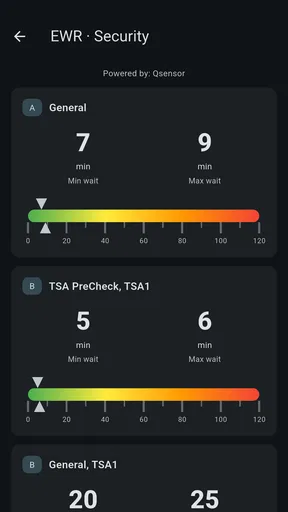
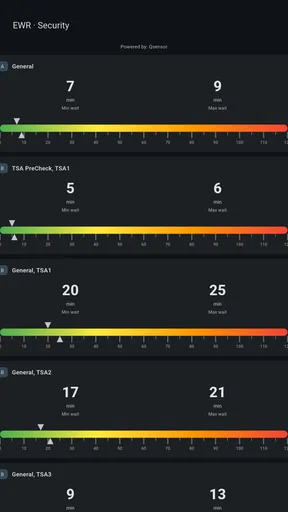
The second alternative is the official airport website or airport information service. That can be preferable when I need terminal guidance, parking information, security details, or broader airport instructions. The focused app is more convenient for repeated flight checks from a phone, but it should not be mistaken for a complete guide to every service at Newark.
The third alternative is a general flight-tracking app. Those tools are better for people watching flights across multiple airports, following a whole itinerary, or monitoring travel for several family members in different places. Newark Airport EWR is the better fit when the airport itself is the constant and the question is specifically about arrivals, departures, gates, or delays there.
In other words, I see this app as a companion rather than a universal replacement. It can sit beside an airline app and an airport source, with each tool handling the job it is best suited for. That division is actually helpful: one app gives me the focused EWR status, another handles passenger-specific travel details, and an official airport source covers practical terminal information.
Who should install it and who should skip it
I would recommend Newark Airport EWR to someone who regularly uses Newark, meets arriving passengers there, or wants a dedicated way to check EWR flight movement. The average rating is 4.5 from around 141 ratings, with around 33 written reviews, and the app has passed 10K+ installs. Those figures suggest a modest but established audience, rather than the scale of a major all-purpose travel platform.
I would also recommend trying it if you dislike the clutter of broad travel apps. A narrow tool can be easier to reach when all you need is one airport’s operational picture. The free entry point makes experimentation reasonable, provided you remember that optional purchases are available and that the app is not a replacement for airline communication.
I would skip it if Newark is only a rare part of your travel and you already rely on a multi-airport tracker that handles your needs well. I would also skip it as a sole travel tool if you expect booking management, boarding passes, baggage instructions, terminal maps, or personalized disruption support. Those needs point toward an airline app, an official airport resource, or a broader travel organizer.
For older Android hardware, check that the phone runs Android 7.0 or later before spending time looking for it. For younger users, consider the Mature 17+ rating. These are simple checks, but they prevent an otherwise avoidable installation disappointment.
My next-step recommendation after the first check
After the first successful lookup, I would keep the app only if it improves a real Newark routine. Try it on the next trip when you need to check both before leaving and near the airport. Notice whether the focused view helps you make decisions faster than your usual method. If it does, the app has earned a place on your phone without needing to become your only source of truth.
My preferred workflow is simple: use Newark Airport EWR for a quick EWR status check, use the airline for passenger-specific instructions, and verify important changes through official channels before taking an irreversible step. That combination respects what the app does well while protecting you from the common mistake of treating one live-status screen as a guarantee.
Overall, I find it a sensible free utility for Newark travelers who want arrivals, departures, gates, and delays gathered around one airport. Its value is strongest when the question is immediate and specific. It is less convincing for broad trip planning, multi-airport monitoring, or airline account management. If Newark is the airport you need to watch, this focused approach can save time; if Newark is only one small part of a complicated itinerary, choose a broader travel tool and keep this as an optional reference.
Pros
- Provides live flight status and terminal information for EWR travelers.
- Useful maps help locate gates
- parking areas
- and airport facilities.
- Shows airline and airport contact details in one convenient place.
- Can help users plan departures by checking airport information before leaving.
- Simple layout makes essential travel details quick to find.
Cons
- Some information may become outdated if airport changes are not synced quickly.
- Navigation features may be less useful without a reliable internet connection.
- Does not replace airline apps for check-in
- boarding passes
- or baggage updates.
- Airport directions can be confusing for first-time visitors during busy periods.
- Features may be limited compared with larger
- official airport platforms.
FAQs for Newark Airport EWR
What is Newark Airport EWR, and what can the app help me with?
Newark Airport EWR is designed to help travelers find useful information about Newark Liberty International Airport, including terminals, airlines, flight details, parking, ground transportation, dining, and airport services. After exploring it, I found it most helpful for organizing an airport visit and checking practical details before leaving home, although travelers should still confirm important information with their airline or the official airport website.
Can I use Newark Airport EWR to check flight status and terminal information?
The app can provide convenient access to flight-related information, such as arrivals, departures, delays, and terminal details, depending on the version and data sources available. This is useful when planning a pickup or deciding when to leave for the airport. However, flight schedules can change quickly, so I recommend comparing the displayed information with your airline’s official updates before traveling.
Does Newark Airport EWR include maps, directions, parking, and transportation information?
Yes, one of the app’s most practical purposes is helping users understand the airport layout and available ways to reach or leave Newark Liberty International Airport. Information may include terminal guidance, parking options, rental cars, taxis, rideshares, trains, buses, and other transportation services. Because road conditions, fees, and operating schedules may change, verify current details before relying on them.
Is Newark Airport EWR free to download and use?
The availability and pricing can depend on the platform, app version, and any optional features offered by the developer. Before downloading, check the Google Play Store or Apple App Store listing for the current price, advertisements, subscriptions, and in-app purchases. In my experience reviewing airport apps, the basic information is often free, but some convenience features may require additional payment or registration.
Does Newark Airport EWR work offline, and is it reliable for international travelers?
Some airport information may remain accessible without an internet connection, but live flight updates, navigation, transportation schedules, and other changing details generally require mobile data or Wi-Fi. International travelers should also consider roaming costs and download essential information in advance. The app is useful as a planning companion, but it should not replace airline notifications, airport announcements, passports, or other required travel documents.


